2 IEM Replacement Cable Options: Choose by Connector Need

4 Logitech Mice for Video Editing: Choose by Navigation Style

About the Author
Sesera editorial account organizes laptop, mini PC, smartphone, and gadget buying guides so readers can check the important points before buying.
Choosing a video-editing mouse comes down to how you navigate the timeline. The MX Master 4 has a thumb wheel for side-to-side scrolling; the MX Ergo S uses a thumb-controlled trackball.
| Product | Featured navigation control |
|---|---|
| Logitech MX Master 4 | Thumb wheel for side-to-side scrolling |
| Logitech MX Master 3S | Thumb wheel for side-to-side scrolling |
| Logitech MX Ergo S | Thumb-controlled ball |
| Logitech MX Anywhere 3S | MagSpeed top wheel |
Sources: Logitech MX Master 4 official U.S. product page · Logitech MX Master 4 official support guide · Logitech MX Master 3S official U.S. product page · Logitech MX Master 3S official setup guide · Logitech MX Anywhere 3S official U.S. product page · Logitech MX Ergo S official U.S. product page · Photo: Logitech MX Master 3S HS01.jpg by Hayden Schiff, CC BY 4.0 (resized, not cropped).
1. Logitech MX Master 4
Best for Premiere Pro timeline navigation
The MX Master 4 thumb wheel supports side-to-side scrolling and configurable app-specific assignments, including a Premiere Pro timeline navigation example. No editing-speed or ergonomic test was conducted.
Logitech MX Master 4
2. Logitech MX Master 3S
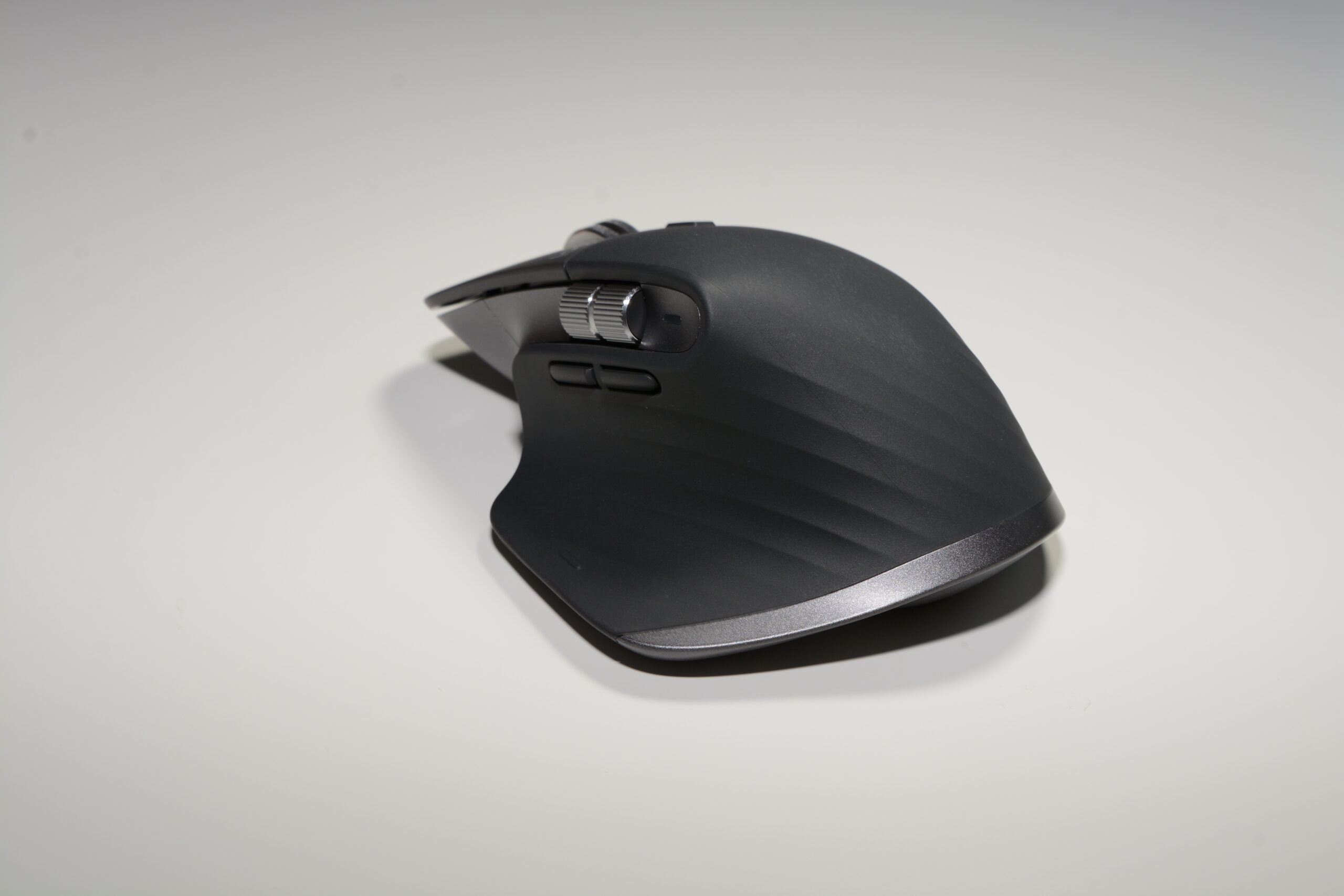
Best for Thumb-wheel timeline navigation
The MX Master 3S thumb wheel supports side-to-side scrolling, with app-specific settings that include a Premiere Pro timeline navigation example. No editing-speed or ergonomic test was conducted.
Logitech MX Master 3S
3. Logitech MX Ergo S
Best for Thumb-controlled trackball
The MX Ergo S has a thumb-controlled trackball, 20-degree tilt, and six customizable buttons.
Logitech MX Ergo S
4. Logitech MX Anywhere 3S
Best for Compact wireless travel
The MX Anywhere 3S is a compact wireless mouse with Bluetooth connections for up to three devices.
Logitech MX Anywhere 3S
Which should you choose?
- For Premiere Pro timeline navigation, choose the MX Master 4: its thumb wheel scrolls side to side with configurable app-specific assignments. The MX Master 3S also supports this Premiere Pro timeline assignment.
- For thumb-wheel timeline navigation, choose the MX Master 3S: its thumb wheel scrolls side to side with app-specific settings, including a Premiere Pro example. The MX Master 4 also supports this function.
- For a thumb-controlled trackball with tilt and customizable buttons, choose the MX Ergo S: it offers 20-degree tilt and six customizable buttons.
- For a compact travel mouse, choose the MX Anywhere 3S: it has a compact wireless design with Bluetooth connections for up to three devices.
Related Articles
-


- Best Headsets and Earbuds for Work Calls: Wired, Open-Ear, and Wireless Picks
- 2 USB-C Hubs: Higher PD Allocation or Compact, Lightweight Design?
- 3 Wireless Touchpad Keyboards for TV, Windows, or Portable Use
- 3 Portable Receipt Scanners: One-at-a-Time or Document Batches
- 2 Ethernet Cable Strippers for Mid-Span Access or a Stated Diameter Limit
- Fitbit Air or Inspire 3: which tracker should you buy?
- PA279CDV vs PA279CRV: OLED or IPS?
- How to use wireless earbuds on a plane: in-flight Bluetooth transmitters

