2 IEM Replacement Cable Options: Choose by Connector Need

How to use wireless earbuds on a plane: in-flight Bluetooth transmitters

About the Author
Sesera editorial account organizes laptop, mini PC, smartphone, and gadget buying guides so readers can check the important points before buying.
On a long flight, watching the seat-back movie on the wireless earbuds you already own keeps the seat area free of a headphone cable.
The connection is not the same as watching a video on your phone. It is also easy to mix up whether Bluetooth is allowed in airplane mode, and whether you need another device.
Check what screen you will watch, and which jack the seat-back monitor uses. That tells you when a transmitter is worth packing.
Whether you need a transmitter depends on the seat-back monitor
Videos stored on a phone or tablet go straight from the device to the earbuds. No transmitter.
A seat-back monitor with Bluetooth also needs no transmitter. JAL’s A350-1000, for example, can connect your own wireless headphones in every cabin.
Use a transmitter when the seat-back monitor only has a 3.5 mm headphone jack. This is not a gadget for in-flight Wi-Fi. It is a small box that turns the wired audio from that jack into Bluetooth for your earbuds.
| What you play | Transmitter | How you connect |
|---|---|---|
| Video on a phone or tablet | No | Bluetooth from the device to the earbuds |
| Seat-back monitor with Bluetooth | No | Bluetooth from the monitor to the earbuds |
| Seat-back monitor with a 3.5 mm jack only | Yes | Plug the transmitter into the jack, then pair the earbuds |
Quick comparison of four in-flight transmitters
The shortlist changes with one listener vs two. If a two-prong adapter is needed, check the box contents. On a long-haul flight, check the rated battery hours too.
One person: AirFly SE. Two people sharing: AirFly Pro 2 Deluxe. If you also want a two-prong adapter in the box, Sanwa Direct. If you want Japan support, ELECOM.
| Product | Paired earbuds | Two-prong adapter | Battery | Fits |
|---|---|---|---|---|
 Twelve South AirFly SE Twelve South AirFly SE | 1 set | Sold separately | 20+ hours | One person |
 Twelve South AirFly Pro 2 Deluxe Twelve South AirFly Pro 2 Deluxe | 2 sets | In the box | 25+ hours | Two people, TX/RX |
 Sanwa Direct 400-BTAD013 Sanwa Direct 400-BTAD013 | 2 sets | In the box | About 20 hours | Two-prong, Japan SKU |
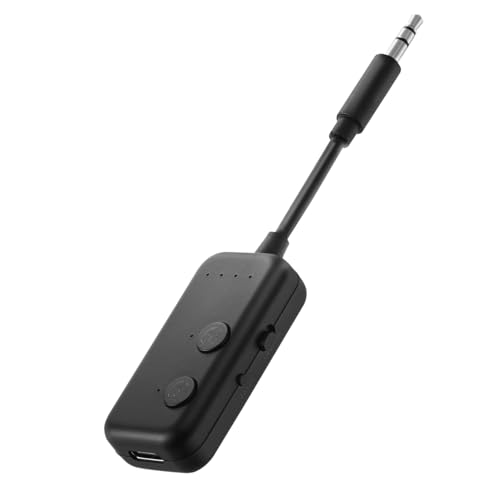 ELECOM LBT-ATR02ECBK ELECOM LBT-ATR02ECBK | 2 sets | Sold separately | About 20 hours | Japan support |
Four in-flight Bluetooth transmitters
Twelve South AirFly SE: one person
If only one person watches the seat-back screen, AirFly SE is enough. It is transmit-only, for people who do not need two pairs or a receive mode.
It pairs one set of earbuds. Rated battery life is 20 hours or more.
It cannot share audio with a second pair, and it does not include a two-prong adapter. Pack one if that flight needs it. Specs such as battery hours are on the Twelve South AirFly page.
Twelve South AirFly SE
Twelve South AirFly Pro 2 Deluxe: two people
If a travel partner should hear the same movie, or you also want a car AUX jack, AirFly Pro 2 Deluxe is the pick.
It pairs two sets of earbuds. Rated battery life is 25 hours or more. It switches between transmit (TX) and receive (RX). Deluxe includes a two-prong adapter.
One person on a seat-back screen will not use all of this. Confirm the listing name says Deluxe, not the regular Pro 2. Adapter contents are on the Twelve South AirFly Pro 2 page.
Twelve South AirFly Pro 2 Deluxe
Sanwa Direct 400-BTAD013: two-prong in the box
If two people will listen and you want a two-prong adapter in the same purchase, the Japan-market 400-BTAD013 is the pick.
It pairs two sets of earbuds. Rated battery life is about 20 hours. It can run while charging. A two-prong adapter is in the box.
With two sets connected, both drop to the standard Bluetooth audio codec (SBC). After a reconnect, volume resets, so start low before playback. Dual-connect codec and volume behavior are on the Sanwa Direct product page.
ELECOM LBT-ATR02ECBK: Japan support
If a Japan support desk and warranty matter, LBT-ATR02ECBK is the pick. The product page also states the Japan radio certification (giteki) for use in Japan.
It can send to two sets of earbuds. Rated battery life is about 20 hours. It can run while charging. Warranty is one year.
The Bluetooth audio codec is SBC only. No two-prong adapter in the box. Pack one if that flight needs it. Codecs and box contents are on the ELECOM product page.
Pair and charge before you board
First-time setup at the seat makes it harder to see why it will not connect. Try it at home in a setup close to real use.
- Try it at home. Plug the transmitter into a PC, TV, or game console with a 3.5 mm jack, power-cycle it, then practice reconnect and volume.
- Charge both. Fill the transmitter and the wireless earbuds or headphones.
- Check AirPods pairing. The steps differ by model. Use Apple’s AirPods user guide.
- Pause auto-reconnect. If AirPods jump back to an iPhone or Mac, turn Bluetooth off on nearby devices until the first pairing is done.
- Register a second pair. For two listeners, save both sets. After a restart, both should still connect.
- Pack the small parts. Put the transmitter and charge cable in a carry-on pouch. Add a two-prong adapter if that flight needs it.
One hole vs two holes
If the jack is a single hole, plug the transmitter’s 3.5 mm plug straight in. If it sits shallow, sound may drop. Push it in fully without forcing it.
On two holes, try one plug first. If you only hear one ear, or left and right are split across holes, try a two-prong adapter. Some JAL seats with two holes still work with one plug, so the adapter is not always required.
| Jack | What to try |
|---|---|
| One hole | Plug 3.5 mm in directly |
| Two holes, both ears | Use one plug as-is |
| Two holes, one ear or split L/R | Use a two-prong adapter |
If there is no sound, check the plug, whether the seat-back video is playing, whether seat volume is up, and whether the transmitter is in TX mode.
Do not hang the body or cable weight on the armrest jack, and keep it out of the aisle. An example of two-hole seats that work with one plug is in the JAL inflight guide.
Lip-sync and battery before you fly
A low-latency codec only helps when both the transmitter and the earbuds support the same codec. A Bluetooth version such as 5.3 does not, by itself, tell you the delay.
AirPods do not support aptX. No mix is guaranteed to have zero lip-sync error, and some products fall back to SBC with two pairs connected. Before you fly, try the earbuds you will actually watch a movie with.
Rated battery life is 25 hours or more on AirFly Pro 2 Deluxe, and about 20 hours on the other three. Hours drop with extra pairs and heavier use, so pick a rating with slack beyond the flight length.
Seat USB power is not consistent. Sanwa Direct and ELECOM can charge while in use, but do not count on inflight power. Board with the transmitter and earbuds full.
Follow the airline and the crew
Set phones and tablets to airplane mode so cellular radios toward the ground are off. Then connect devices that stay in the cabin, such as the transmitter and wireless earbuds, over Bluetooth.
ANA and JAL official pages allow Bluetooth between devices. On a codeshare, follow the operating carrier. Limits can change with the aircraft and the flight, so the cabin announcement and crew come first. ANA and JAL notes do not automatically apply to other airlines.
If that flight’s seat-back monitor has Bluetooth built in, the on-screen instructions are the procedure. Skip the transmitter and pair the earbuds to the monitor.
Carry-on and checked-bag rules for battery devices follow the airline you fly. Transmitters used in Japan also need the giteki mark on the body or screen.
Official pages: ANA carry-on and Bluetooth / JAL electronics / Japan MIC giteki guide.
Pack a transmitter that matches the seat
No transmitter for phone or tablet video, or a Bluetooth seat-back monitor. You need one for a 3.5 mm-only seat-back jack.
- One person: Twelve South AirFly SE. Confirm a two-prong adapter separately.
- Two people plus TX/RX: Twelve South AirFly Pro 2 Deluxe. Confirm Deluxe, not the regular model.
- Two-prong adapter in the box: Sanwa Direct 400-BTAD013. Check the codec on the earbud side.
- Japan support: ELECOM LBT-ATR02ECBK. Confirm a two-prong adapter separately.
Pair the transmitter and earbuds before you leave, charge both, then check that aircraft and the inflight rules for your flight.
Related Articles
-


- 3 Wireless Touchpad Keyboards for TV, Windows, or Portable Use
- PA279CDV vs PA279CRV: OLED or IPS?
- 3 Portable Receipt Scanners: One-at-a-Time or Document Batches
- 4 Logitech Mice for Video Editing: Choose by Navigation Style
- Fitbit Air or Inspire 3: which tracker should you buy?
- 2 Recommended USB-C-Only Hubs
- 2 Ethernet Cable Strippers for Mid-Span Access or a Stated Diameter Limit
- Best Headsets and Earbuds for Work Calls: Wired, Open-Ear, and Wireless Picks
